

When you first connect your calendars, every booking already on them comes into TIOO, but without the guest's email, phone, booking reference or price. Booking emails only fill in bookings from now on. For the bookings you already have, upload the reservations file you can download from your booking site.
This upload is free on every plan.
Note: The upload only adds details to bookings that are already in TIOO. It never creates a booking. Connect your calendars first (see Connect your Booking.com calendar) and wait for the bookings to come in.
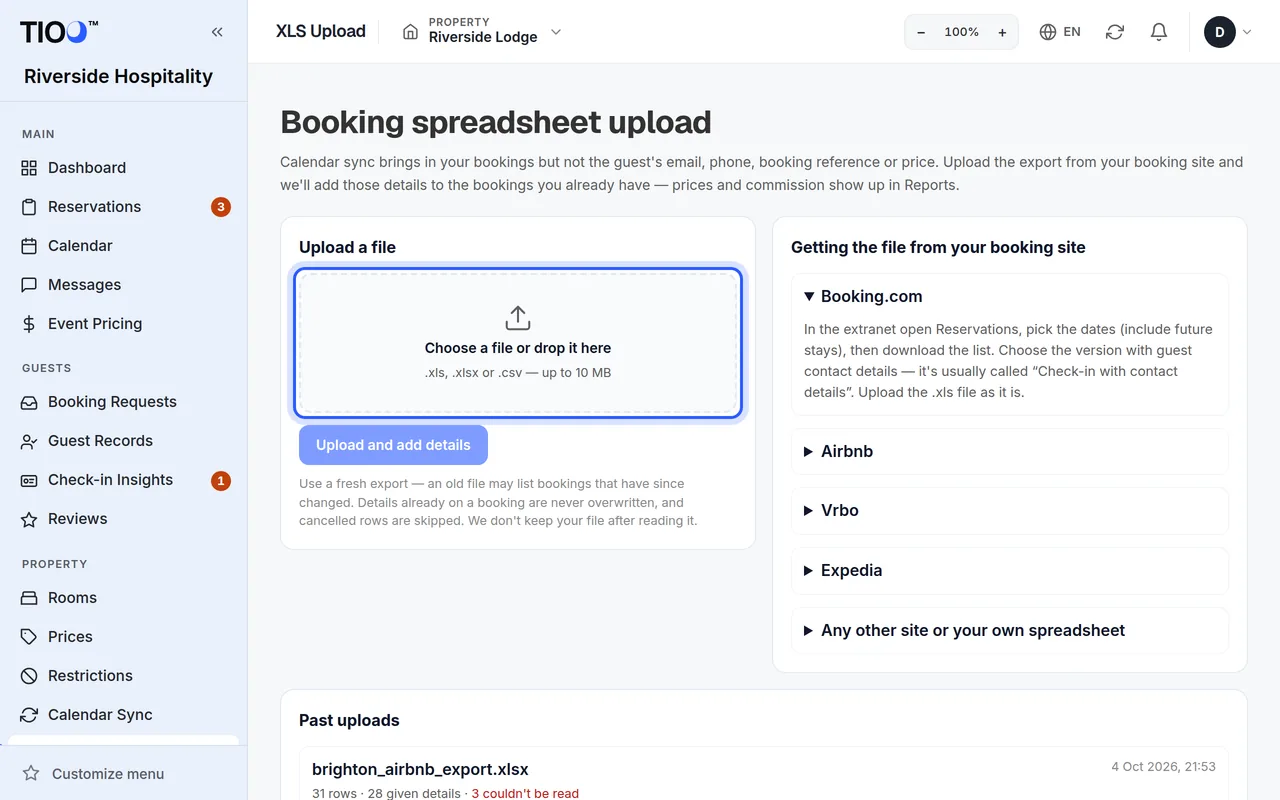
1. Download the file from your booking site
- Booking.com: in the Extranet open Reservations, pick the dates (include future stays), then download the list. Choose the version with guest contact details. It's usually called "Check-in with contact details". Upload the .xls file as it is.
- Airbnb: open Reservations from the Today page, show all reservations, then use Export to download a CSV. Airbnb's file has the confirmation code and the guest's phone but no email address. That's normal.
- Any other site or your own spreadsheet: any file works as long as it has a guest name column and a check-in date column. A booking reference column gives the most reliable match.
The page lists these steps too, under Getting the file from your booking site, along with the Columns we read.
2. Upload it
- Open XLS Upload in the menu.
- Under Upload a file, click Choose a file or drop it here and pick your file. It can be .xls, .xlsx or .csv, up to 10 MB.
- Click Upload and add details.
TIOO reads the file in the background. The results page updates by itself. A big file can take a minute, and you can leave and come back to it from Past uploads.
3. Read the results
At the top you see four numbers:
- Rows read: rows in your file.
- Bookings given details: bookings that got new details.
- Already up to date: bookings that already had everything.
- Not used: rows that couldn't be used, for example because no booking matched.
Open Row by row to see what happened to each row. Download rows not used (CSV) gives you the rows that weren't used, so you can check them.
If no row matched, the calendar usually hasn't brought those bookings in yet. Check each room on Calendar Sync.
Good to know
- Details already on a booking are never overwritten. Cancelled rows are skipped.
- Use a fresh export. An old file may list bookings that have changed since.
- From a Booking.com file, TIOO also takes the price and commission. They show up in Reports (Growth plan and above).
- Only the first 2,000 rows of a file are read. Export a shorter date range for the rest.
- If a date like 04/05 could be read two ways, the results page says how TIOO read it.
- TIOO doesn't keep your file after reading it. The results stay in Past uploads for 90 days.
- Owners, admins and managers can upload files.
Related guides
- Connect your Booking.com calendarPaste each room's Booking.com calendar link into TIOO so new bookings appear by themselves.
- Forward your booking emails so guest details fill inSend Booking.com and Airbnb booking emails to your TIOO address and each booking gets the guest's email, phone and booking reference.
- A booking has no email or phoneWhy bookings from Booking.com or Airbnb arrive with only a name and dates, and four ways to fill in the rest.