
Everything for the stay, on the guest's phone.
A guest app that opens from a link: the door code and the unlock button, WiFi, house rules, parking, directions, your number, and check-in before they arrive. In the guest's language, under your name, with nothing to install.
On every plan, including Free10 languages
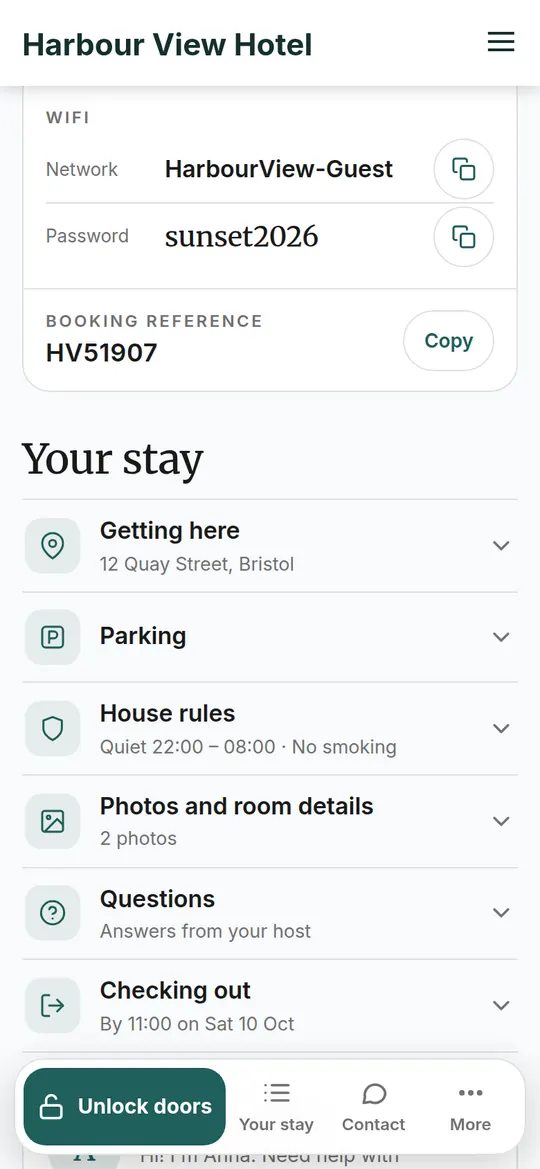
Real screens from the app. Pictures in English, Spanish and Portuguese; the app also speaks the other seven.
The questions guests ask, answered before they ask.
You fill it in once per property — or once for the whole business — and every guest gets their own copy for their own stay.
The door
Unlock the front door and the room with one tap, and the door code for the keypad underneath. Shown from check-in time on arrival day.
With a smart lock, from Starter. Otherwise the key safe code or where to collect the key.WiFi, rules, times
The WiFi name and password with a copy button, check-in and check-out times, quiet hours and your house rules.
Directions and parking
The address with Open in Maps, your parking instructions with a photo, and a photo of the street so they recognise the building.
Call or WhatsApp you
One button to reach the host. You choose whether that's a call, a text or WhatsApp.
FAQs and how-to videos
How the shower works, where the bins go, what's nearby. Questions by category and short videos you add once.
Photos and a countdown
Photos of the room and the building, and before arrival a countdown to the stay. Guests can add the app to their home screen and share it with the people they're travelling with.
Swipe · 1 / 6
It looks like you, because it is you.
The guest app takes the colours of your website and shows your name and your words. Guests don't create an account and don't see a TIOO login.
- A private link per stay
Each guest gets their own link, sent by email or text. It stops working after the stay and the farewell page takes its place.
- Several rooms, one app
A family with three rooms sees every door in one place, with one front-door button and the code for each room.
- Open from a week before
Directions, parking and the rules are there from seven days before arrival; the door appears from the check-in time on the day.
- Preview it in your settings
The settings page shows the real app on a phone as you change colours and content, so you know what guests will see.
Ten languages, picked from the guest's phone.
The app and the check-in open in the language of the guest's phone; the guest can switch with one tap. The emails and texts TIOO sends about the stay follow the same choice. Arabic reads right to left.
A thank-you, and an honest ask for a review.
When the stay ends, the link turns into a farewell page that thanks the guest and asks every guest for an honest review — never only the happy ones — on the site they booked through, or on your own website for direct bookings. TIOO can also send the thank-you by email or text.
TIOO was built inside RoomKeyPin, the founder's own business.
RoomKeyPin is the founder's own guest house: 7 rooms let individually, running since 2016.
Figures from RoomKeyPin's own TIOO account, October 2026. Not rounded up. We don't publish reviews we can't stand behind.
Questions about the guest app
Does the guest app show the TIOO name?
Which languages does it speak?
What can a guest do before they arrive?
Is the guest app on every plan?
Give every guest their own app.
Set up the guest app once; every booking gets its own copy. Free for your first 2 rooms, no time limit.
No card neededKeep your Booking.com and Airbnb listings