
Run the day from your phone.
You're rarely at a desk. Today's arrivals and departures, who's in which room, a text to the guest who's running late, the front door unlocked for the one who's early — on one phone page made for thumbs. And when you need the rest, the whole dashboard works on a phone too.
Every planNothing to install — it's your dashboard in the phone's browser
Made for the front desk
when the front desk is you.
The phone page isn't the computer dashboard squeezed small. It's one column of today's guests, coloured by where they are in their stay, with the two buttons you actually press at the bottom of each card.
Arrivals with their arrival time and whether they've checked in online, departures with the check-out time, and everyone in between. Occupied and vacant rooms at the top.
Tap SMS on a card, pick a ready-made message — your door code, a check-out reminder — or type one. The guest's number is already filled in.
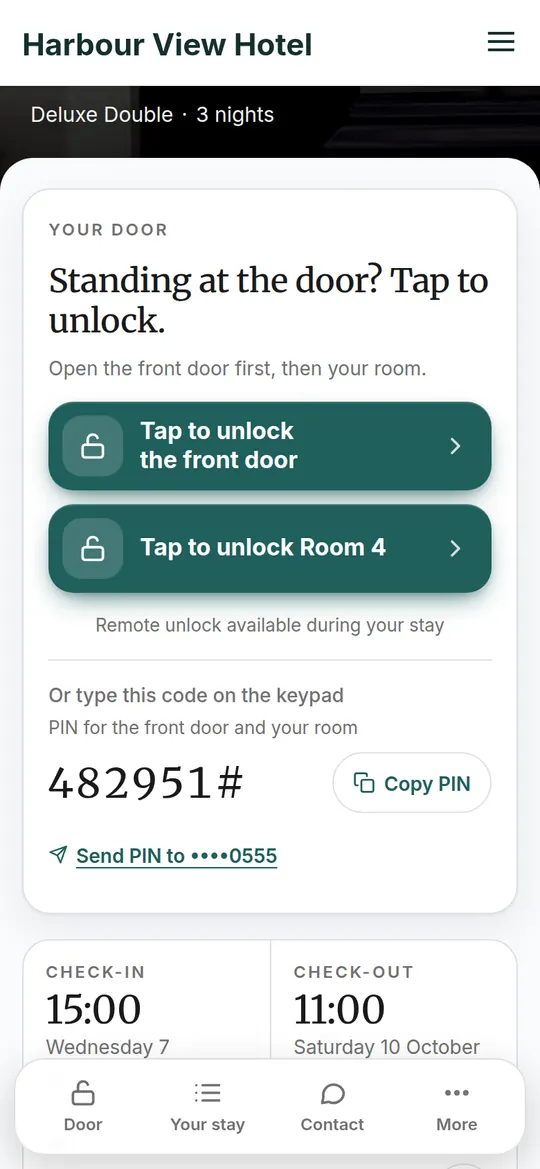
With a TTLock smart lock on the room or the front door, one tap opens it for a guest standing outside. Logged with your name and the time.
The page refreshes itself while it's open, and pauses when it's in the background so it doesn't eat your battery. A guest who opens the door with their phone shows as arrived without you touching anything.
Everything else works
on a phone as well.
Reservations become cards you can expand, the calendar fits the screen, the cleaning board, messages, invoices and settings all have a phone layout with 44-pixel targets. The sidebar folds into a menu; your favourite pages pin to the top.
- Reservations: compact cards, tap to expand, a menu per booking for check-in, edit and cancel
- The in-app bell: a new booking, a payment, a review to approve, an urgent problem
- Upload a guest's ID at the front desk straight from the phone camera
- Add it to your home screen from the browser menu and it opens like an app
Your cleaners and your guests
have their own.
Cleaners get a phone page with only their rooms and a checklist. Guests get the guest app: check-in before they arrive, the door opened with a tap, WiFi, house rules and directions, in ten languages.
Questions about the phone app
Is it an app from the App Store or Google Play?
Can I text guests from it?
Can I unlock doors from it?
Does it work for cleaners?
Open it on your phone now.
The live demo works on a phone too. Join the early access list when you're ready; free for your first 2 rooms, no time limit.
No card neededKeep your Booking.com and Airbnb listings